Airbnb is connected by signing in to your Airbnb account from the channels window and authorising the connection; then you pair your listing with the property. The bookings you already had on Airbnb come in on their own the moment you connect, and from then on every price or availability change goes out to Airbnb instantly.
Before you start
- A GoToCheck account with the channel manager added.
- The property set up in the channel manager and priced. If you have not done that yet, start with How to set up your property in the channel manager: it takes five minutes.
- Your Airbnb username and password (the account the listing belongs to).
- If you use another channel manager today: Airbnb accepts only one at a time. Disconnect it first.
Step 1. Open the property's channels
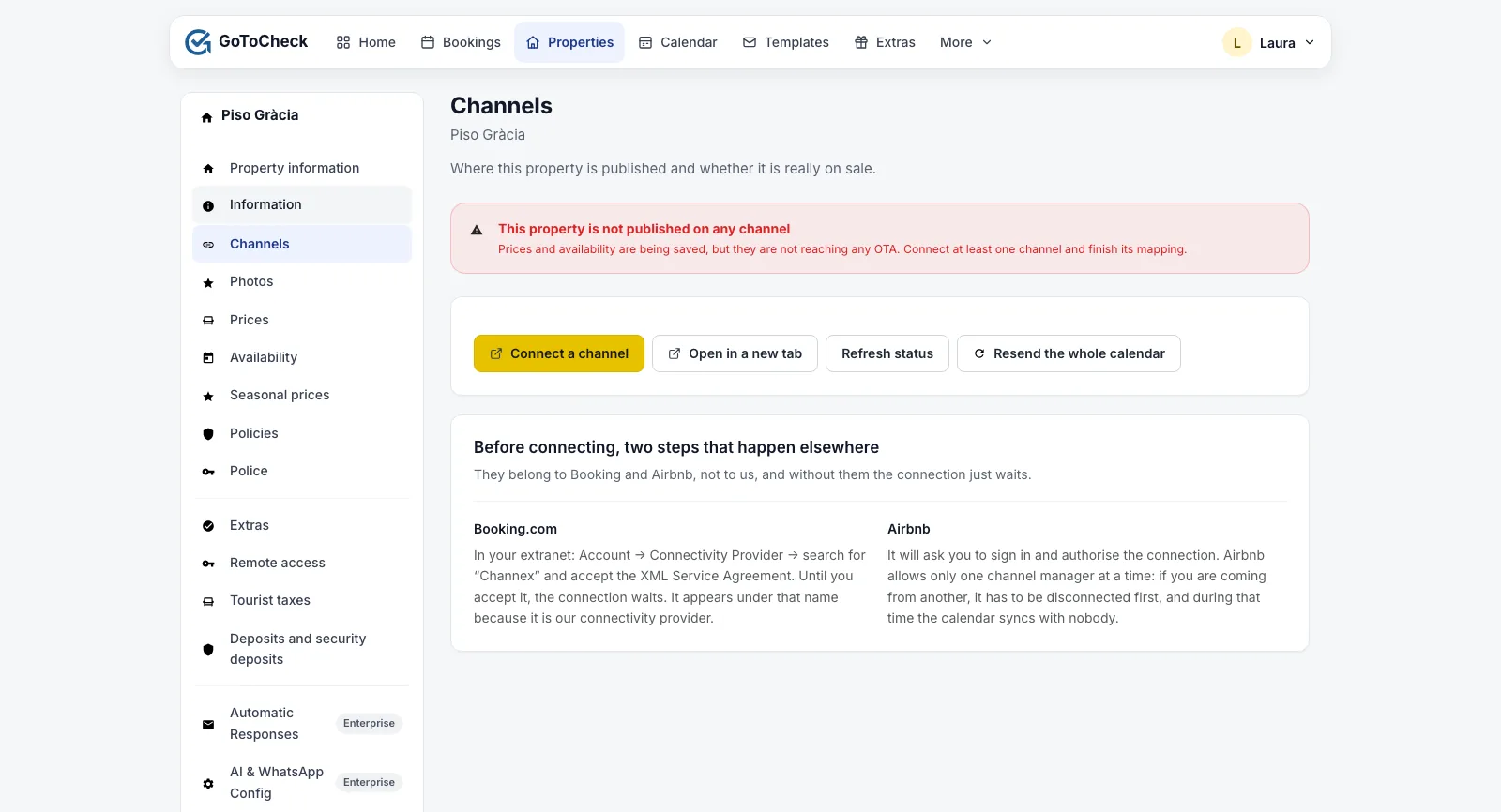
- In Properties, open the property and go to Channels.
- Click Connect a channel. The channels window opens.
Step 2. Prepare your Airbnb account
- On Airbnb, in the listing, go to Availability › Sync calendars and remove the imported iCal calendars (Booking's, Vrbo's or any other). From now on it is the channel manager that closes the dates; if you leave the iCal feeds in, dates will be closed twice and you will not know why.
- If you had another channel manager connected to Airbnb, disconnect it from there. Airbnb accepts only one at a time.
Step 3. Connect with Airbnb
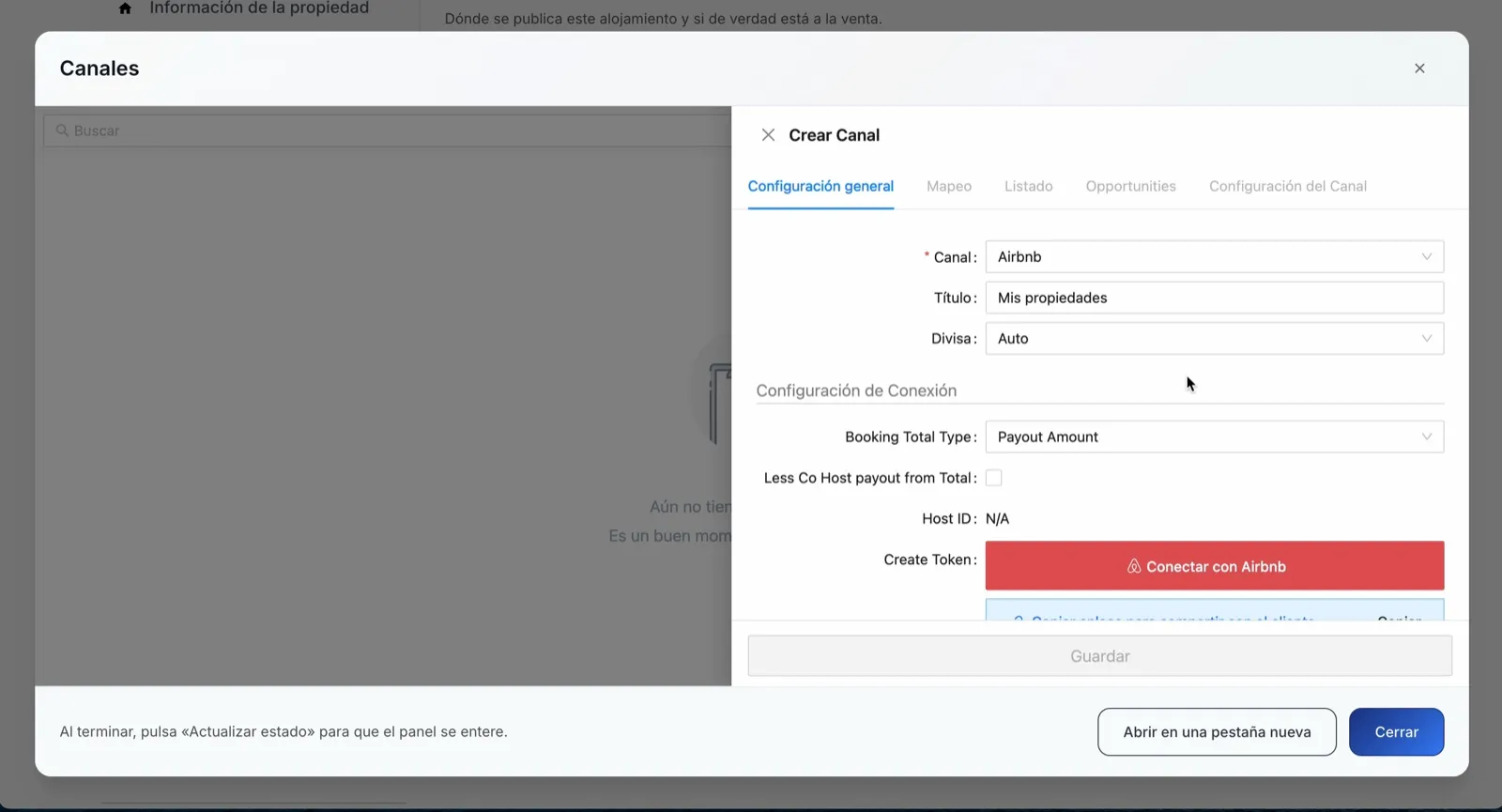
- In the channels window, in Channel, choose Airbnb.
- Click Connect with Airbnb. Airbnb opens: sign in and authorise the connection.
- You come back to the channels window with Airbnb connected.
Step 4. Pair your listing (mapping)
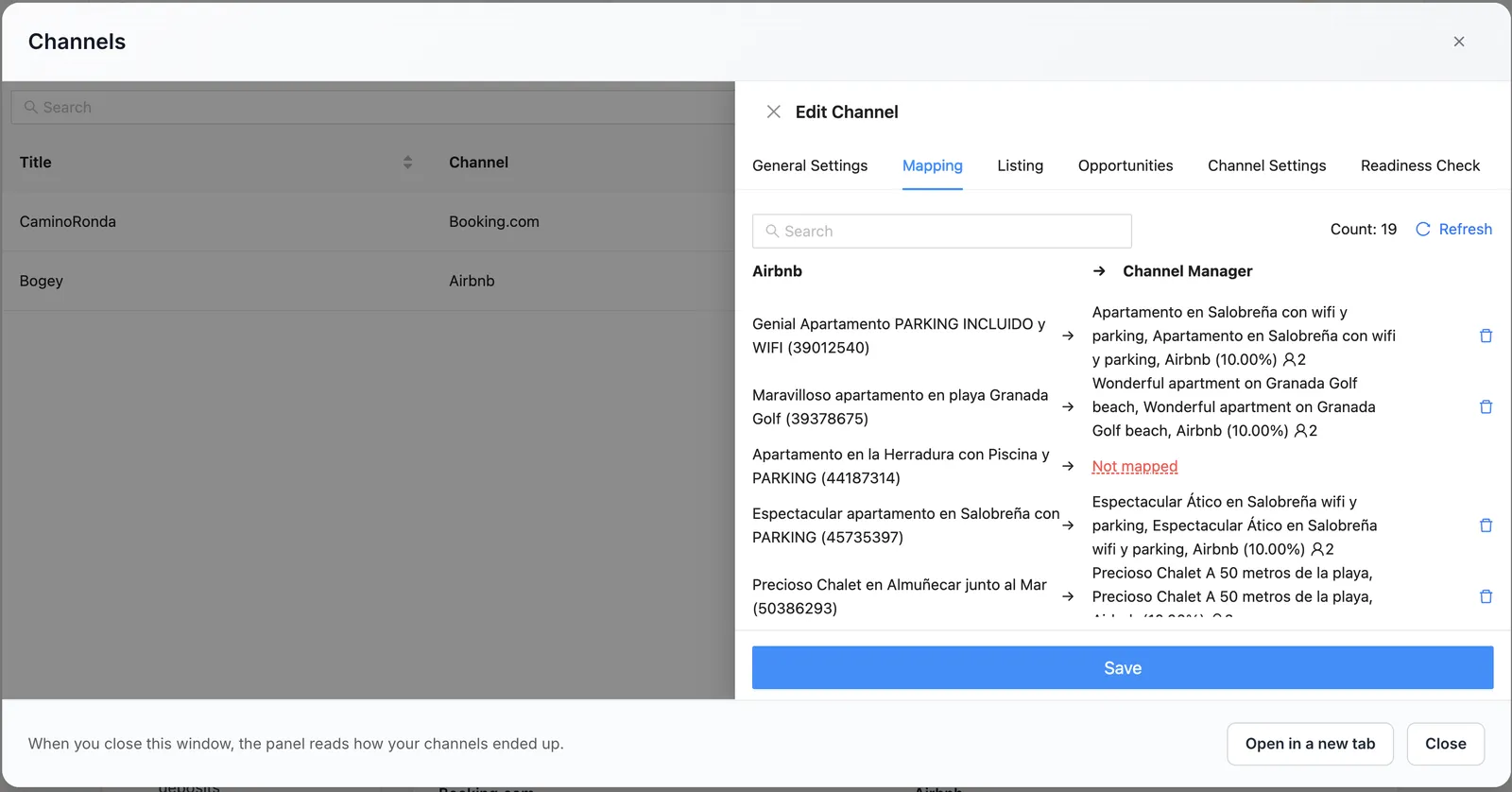
- In the Mapping tab, choose your Airbnb listing and pair its rate with the GoToCheck rate plan “Airbnb (+X%)” (your price with the Airbnb markup you set in Prices).
- Save and activate the channel.
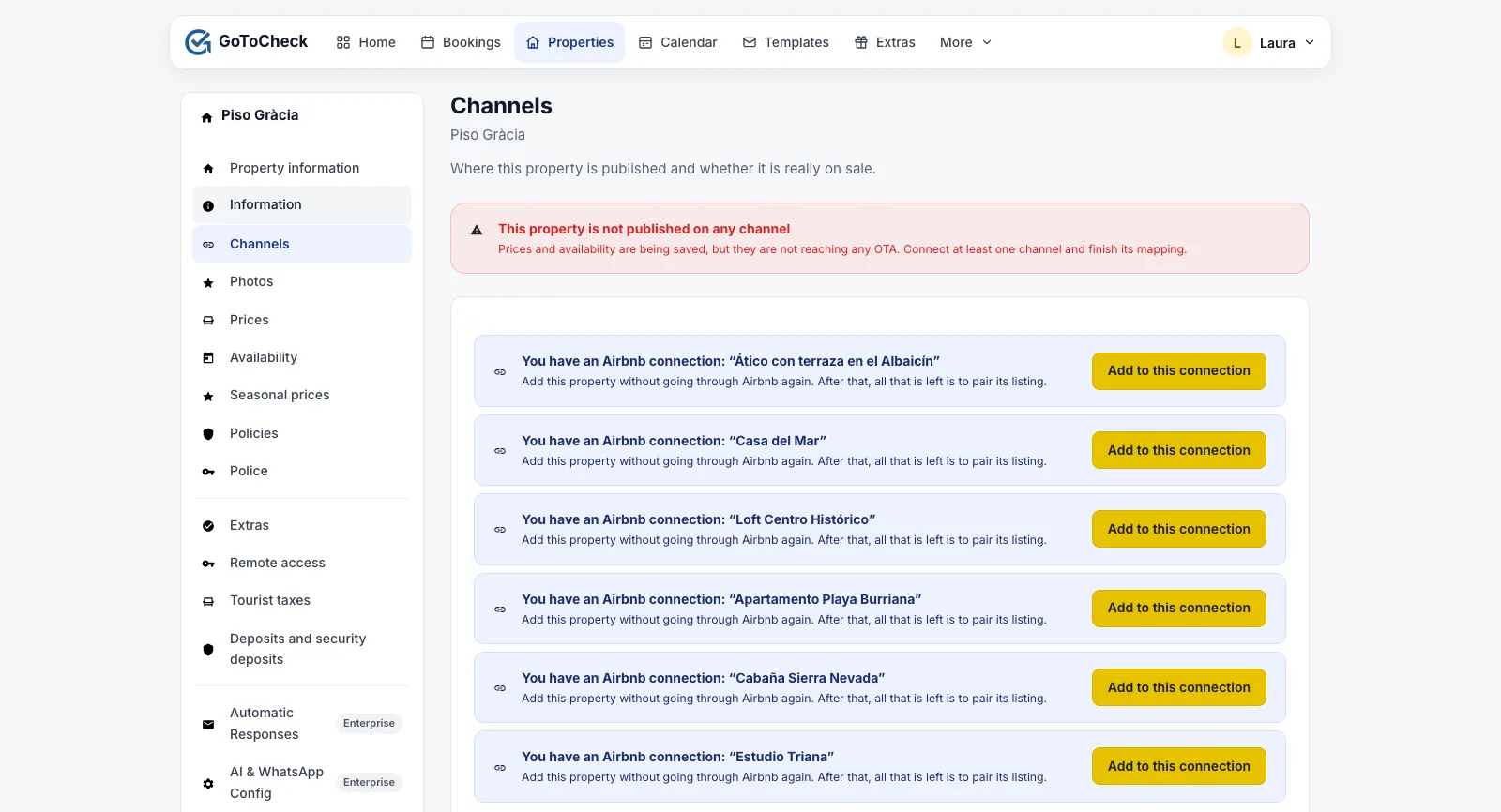
From the second property onwards, do not sign in again. The Airbnb connection covers your whole account. On the Channels screen of each new property your Airbnb connection is already there: click Add to this connection and pair only its listing.
Step 5. Check that it is in sync
- Close the channels window.
- Click Refresh status.
- You should see Published and syncing at the top, and the channel as Publishing.
- Go to Bookings and check that all the bookings you already had on Airbnb are there. Airbnb sends them by itself when you connect: they should already be there, with the guest's name, the dates and the amount.
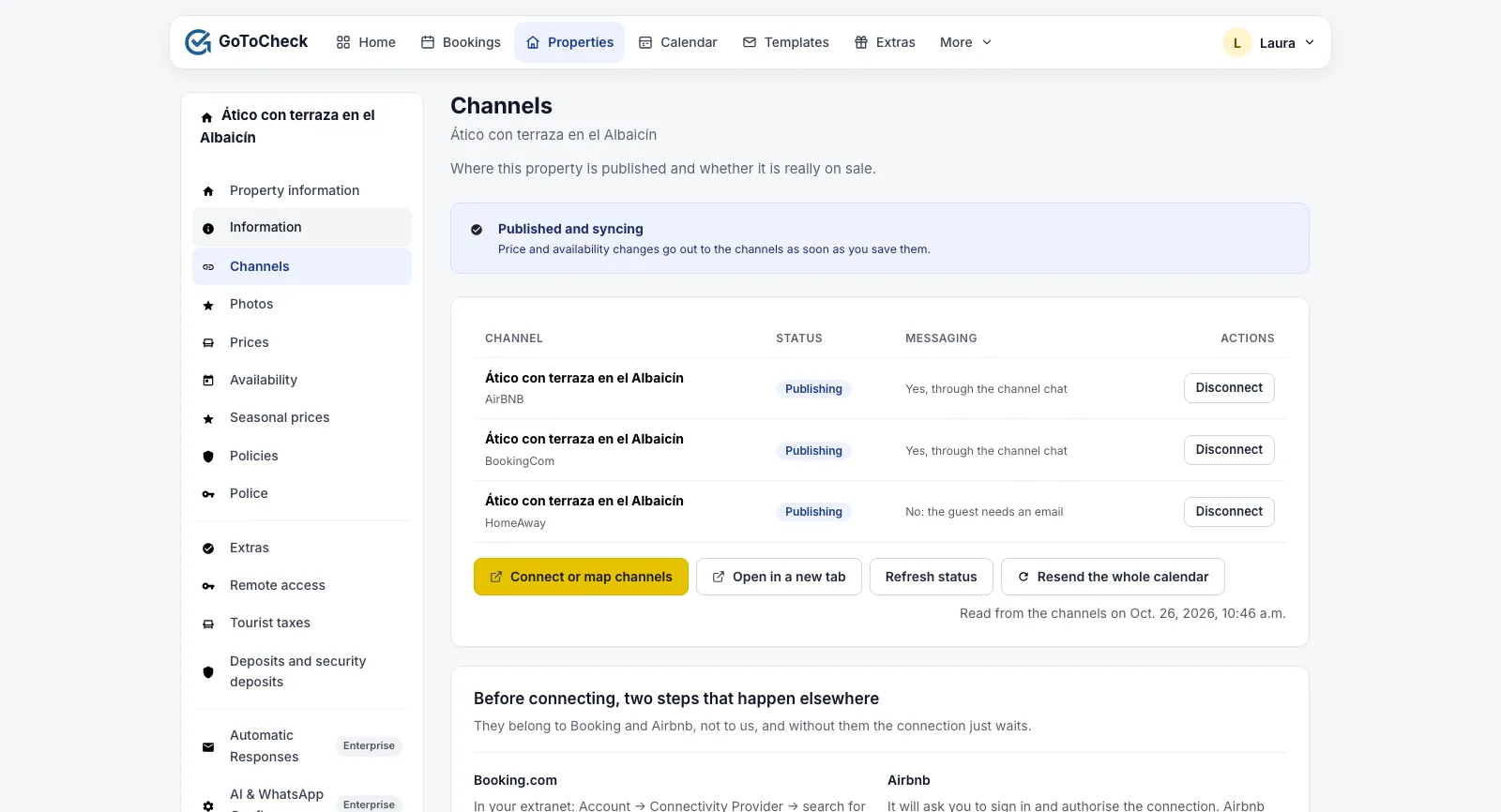
Done
From now on, price and availability changes go out to Airbnb as soon as you save them, and Airbnb bookings, cancellations and messages arrive in your dashboard.
The listing settings: advance notice, availability window and preparation time
Each Airbnb listing has its own settings for advance notice (“how far in advance can guests book”), availability window (“how many months ahead”) and preparation time, and Airbnb always applies the more restrictive of its own and yours. With the channel manager connected, those settings cannot be changed from Airbnb: they are sent from GoToCheck, in Properties › your property › Availability, when you save. If Airbnb turns down last-minute bookings that you would accept, check the advance notice there.
The cleaning fee and the extra guest charge are sent to Airbnb from Prices. Long-stay discounts and promotions remain Airbnb's own.
What each status means
On the Channels screen and in the Connection with the OTAs list, each channel shows one of these statuses:
| Status | What it means | What to do |
|---|---|---|
| not connected | It is not on that site. | Continue from step 1. |
| connected, not mapped | It looks connected, but nothing is published. | Open the channels window again and finish the Mapping tab. |
| publishing | Prices and availability reach the site, and its bookings come into your calendar. | Nothing. |
Common mistakes when connecting Airbnb
Airbnb says there is already software connected
You have another channel manager or program connected through the API. Airbnb accepts only one: disconnect it from that program and try again.
Dates are closed twice, or dates with no booking are closed
There are still imported iCal calendars on Airbnb (step 2). Remove them: with the channel manager connected they are redundant and confusing.
The channel shows as connected but the listing is not selling
The mapping is missing. Go back to the channels window and pair the listing with the property and its rate plan.
Airbnb turns down bookings for tomorrow or the day after
It is the listing's advance notice. Adjust it in Properties › Availability in GoToCheck, which is where it is sent to Airbnb from.
Frequently asked questions
Do I have to connect Airbnb again for each property?
No. The Airbnb connection covers your whole account. From the second property onwards, click “Add to this connection” on its Channels screen and pair only its listing.
Are the bookings I already had on Airbnb brought in?
Yes, Airbnb sends them the moment you connect, with the guest's name, the dates and the amount. What Airbnb does not give is the guest's email: the conversation goes through the Airbnb chat, which you can read and answer from the GoToCheck inbox.
Can I keep changing prices from Airbnb?
Better not: the channel manager would overwrite them in the next sync. Change them in Prices in GoToCheck and they reach Airbnb instantly. Airbnb's discounts and promotions do remain Airbnb's own.
Is the cleaning fee sent to Airbnb?
Yes, and so is the extra guest charge, from Prices.
What happens to messages from Airbnb guests?
They arrive in the GoToCheck inbox and are answered from there; the guest sees them in their Airbnb chat.
Channel manager, online check-in and guest registration in one account
With GoToCheck, the bookings that come in from the sites go straight into online check-in and guest registration with the authorities, without copying data from one program to another.
Try it free for 30 daysStuck on a step? Write to us from your app.gotocheck.pro dashboard or on WhatsApp and we will go through it with you, step by step.